Hunting Scout: The Scouting and Land Analysis Tool I Built Because Nothing Else Did This
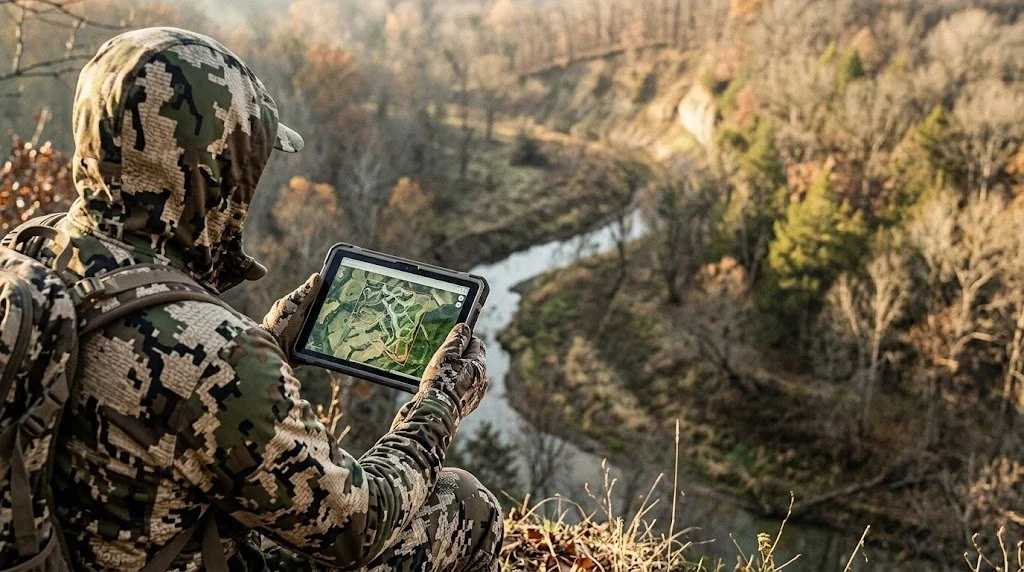
Note: Hunting Scout is a sister brand operated by the same team behind LandsToHunt.com and ScoutFlight Hunting Assessments.
I've spent 25 years walking properties, reading terrain, and figuring out where deer want to be. That process works. But it's slow, it's scattered, and half the critical data you need, wind history, elevation profiles, land cover, public-land boundaries, lives in six different places that don't talk to each other.
So I built Hunting Scout.
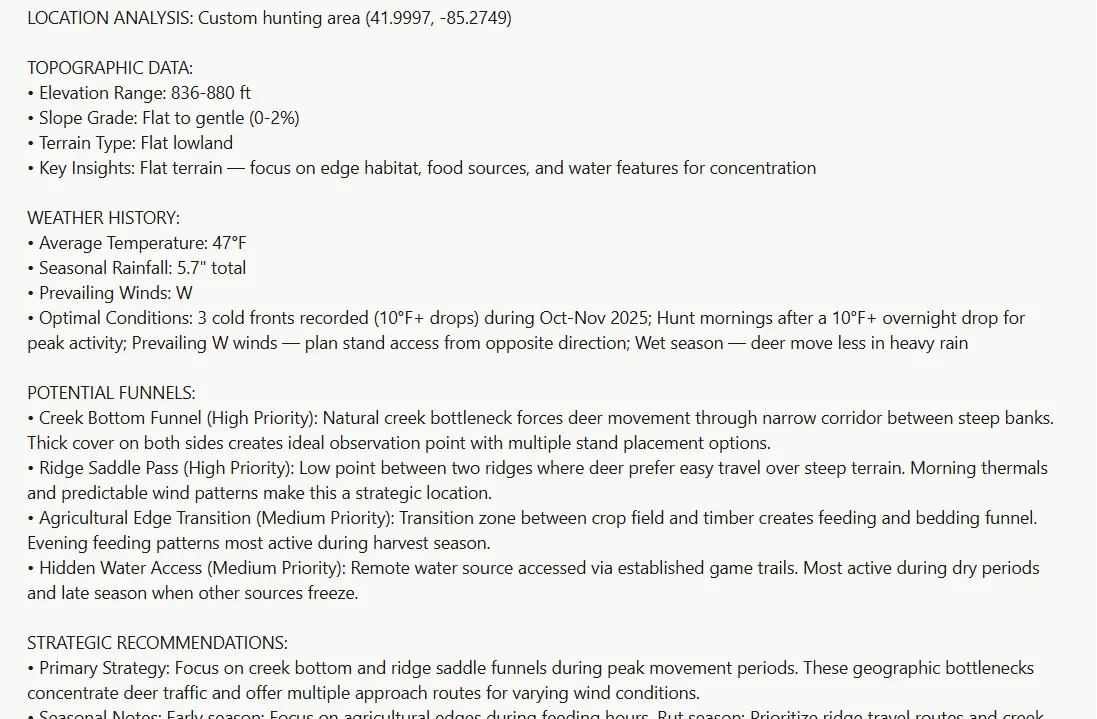
Hunting Scout is a scouting and land analysis tool that pulls real geospatial data from federal sources and turns it into an interactive scouting report for any piece of ground you want to hunt. Public or private. Any state. Type in a location or draw your property boundary, and in about 30 seconds you get a terrain analysis, weather history, tactical feature classification, and wind-scored stand recommendations built from data you can verify.
The elevation comes from USGS 3DEP at LiDAR resolution. The public-land boundaries come from the USGS Protected Areas database. The weather data comes from Open-Meteo and OpenWeather. No AI-generated guessing. The report gives you what the land is telling you, backed by the same federal datasets that land managers and wildlife agencies use.
Three free reports per month. No credit card required to start. Generate your first report here.
What You Get in a Scouting Report
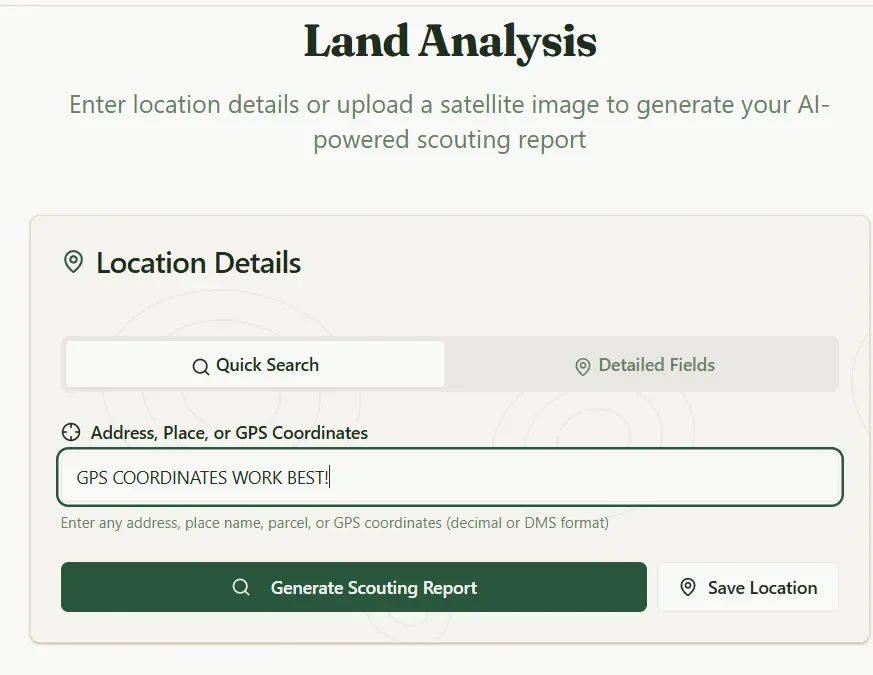
Every report pulls fresh data for the exact coordinates you search. Here's what comes back.
LiDAR-resolution topography. Real elevation range, slope grade, and terrain type pulled from USGS 3DEP. The grid samples densely enough across your property that terrain-aware features see real ridges, benches, and saddles instead of the averaged-away mush you get from coarser elevation models. This is the foundation on which everything else in the report builds.
Accurate land boundaries. Public-land parcels from the USGS Protected Areas database. National Forests, Wildlife Refuges, State Game Areas, Recreation Areas, Wilderness, and BLM land. Each parcel is tagged with hunting-policy rules, so you know at a glance if you can hunt there. Green for hunting allowed, red for restricted, blue for private-hunting-allowed.
Weather history and today's forecast. Last season's averages for your exact coordinates, seasonal prevailing winds, cold-front event counts, and today's live wind direction and speed. This data layer drives the stand scoring and scent analysis throughout the report.
Hunting funnels. The report flags high-priority terrain features, such as creek crossings, saddles, and pinch points, with star markers, and medium-priority features with diamond markers. All derived from USGS topographic and hydrographic data. These are the spots where terrain forces deer movement into narrow lanes, and most hunters walk right past them without a topo map in hand.
Nearby public hunting areas. When your search falls outside any public hunting land, you see the closest huntable parcels, along with their distance and acreage. Click one to rerun the analysis scoped to the boundary immediately to the right. Search for a named public area, such as "Shiawassee NWR," and the app automatically matches the polygon for you.
Draw your own property boundary. For private land, club land, or a specific section of public ground, the Draw Area tool lets you outline your polygon on the map. Everything the app finds, funnels, tactically tags, and prescribes stays within your boundary. Drawn areas give you the tightest terrain analysis possible.
Tactical Features: Your Entire Property Mapped by Hunting Purpose
This is where Hunting Scout separates from everything else on the market.
Long-press any spot on the map and you can classify it by hunting purpose. Not geology-textbook names. Hunter names. The Pass, The Shelf, The Pinch Point, The Lookout, The Pocket, The Boiler Room, The Buffet, The Staging Area, NWSG Bedding, and more than 30 types total.
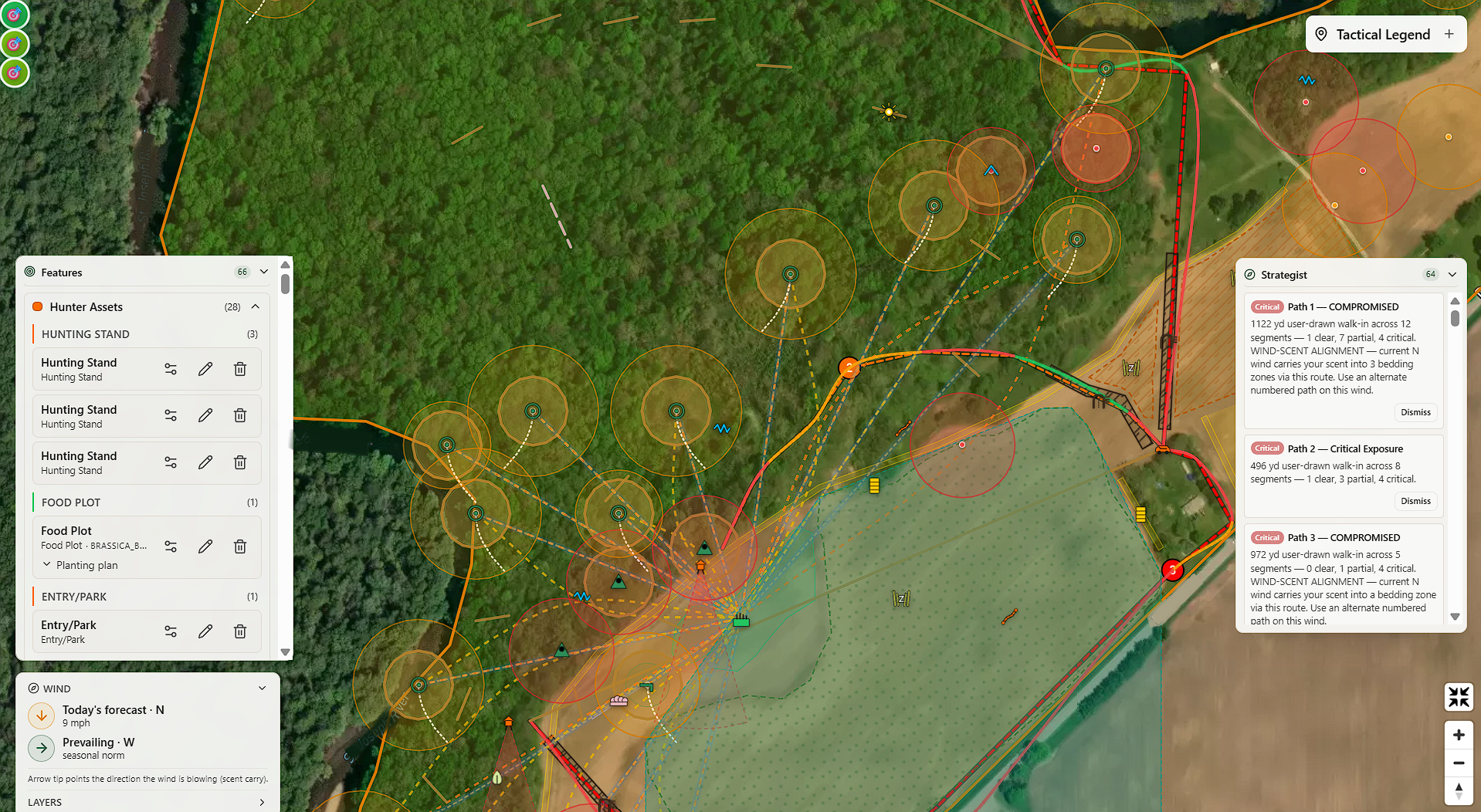
These features group into six categories: Hunter Assets, Security Zones, Interaction Zones, Travel Corridors, Tactical Constraints, and Architectural Cover. Your entire tactical inventory lives in a collapsible sidebar card grouped by feature type within each category, so all your hunting stands sit together, all your food plots sit together, and so on. Click any row to fly the map to that feature. Rename any stand or blind. Adjust the influence zone with a per-feature radius slider.
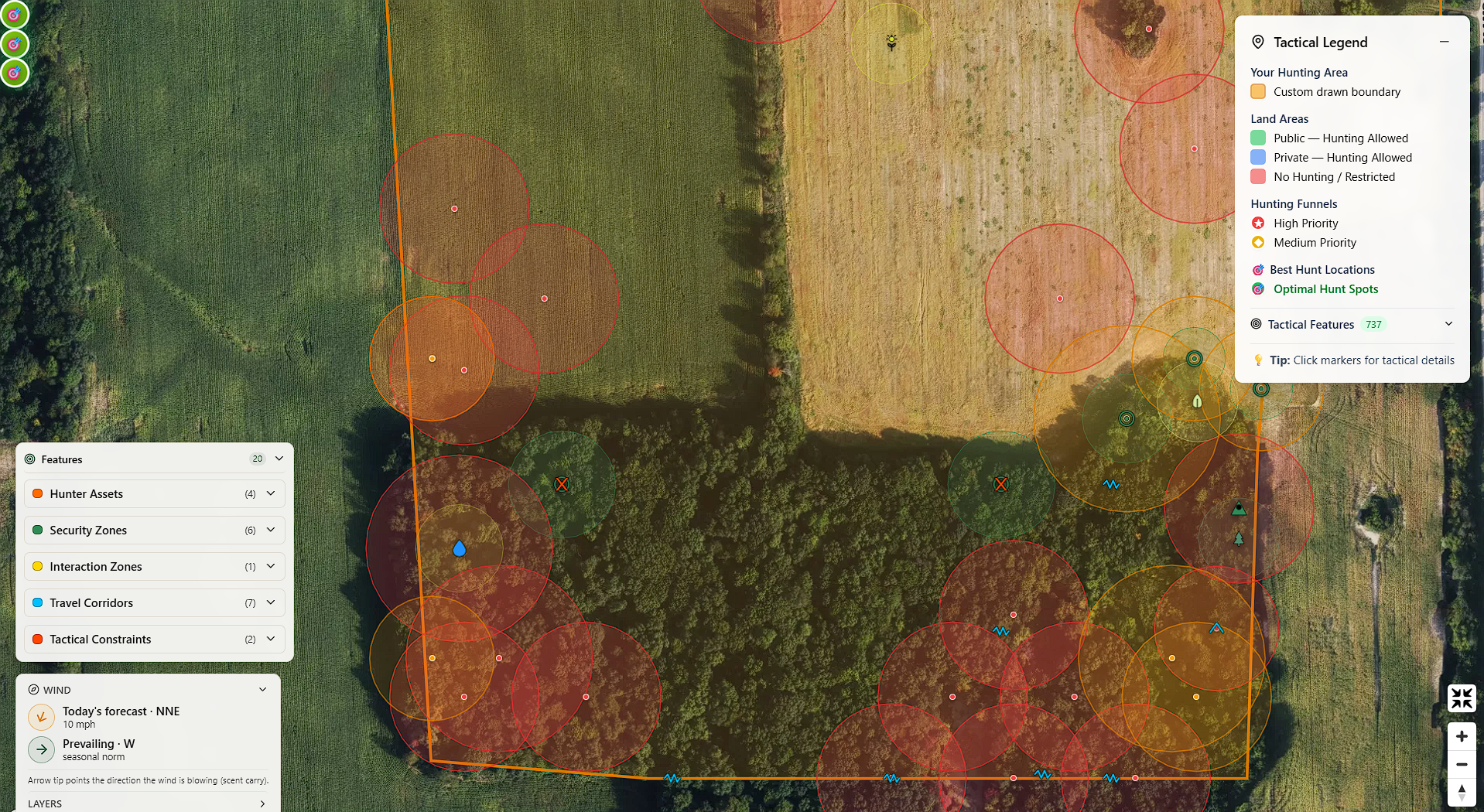
You can place features manually by long-pressing the map, by clicking optimal hunt spots the report identifies, or by hitting Plot on Map to auto-classify every detected funnel in one click.
Every plantable feature you tag gets a per-row planting plan: a species picker filtered to your USDA hardiness zone, the area in acres computed from your drawn shape, the total seed quantity, and a planting tip. Strategist-prescribed rows pre-pick the best-fit species so you review and ship instead of hunting through a catalog.
If you've ever tried to organize your property knowledge in a notes app, a spreadsheet, or a stack of paper topo maps with pushpins, this replaces all of it. Every feature you tag is saved to your account, lives on your interactive map, and feeds into the stand scoring and habitat analysis downstream.
Wind, Scent, and Knowing Which Stand to Hunt Tomorrow
Wind is the single most important variable in whitetail hunting. Hunting Scout treats it that way.
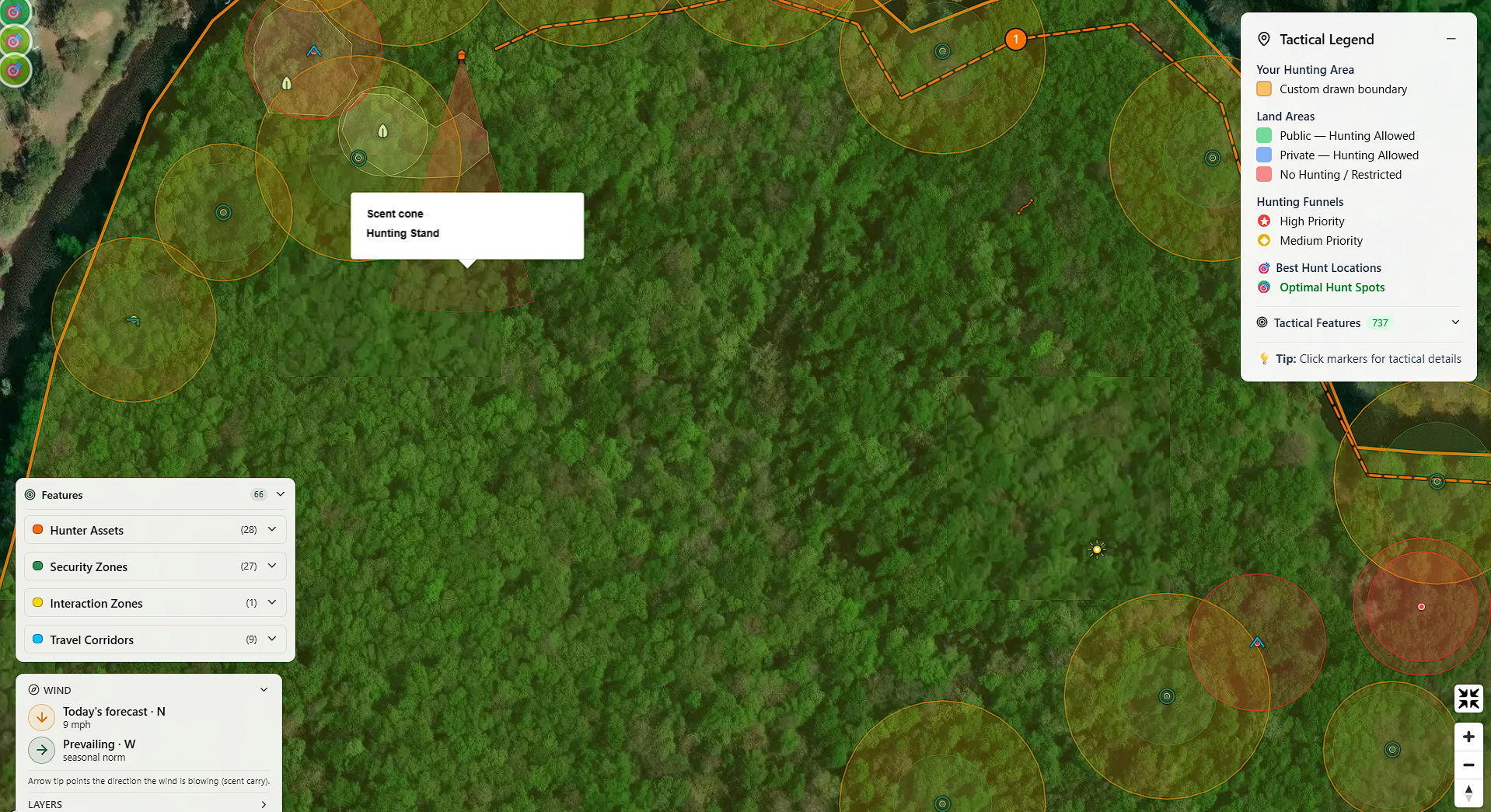
The wind compass widget sits on the map and shows two arrows side by side. The amber arrow is today's forecast wind direction and speed. The forest-green arrow is the seasonal prevailing wind for your coordinates. Arrow tips point downwind, the direction your scent travels. At a glance, you can see whether today's wind matches the historical pattern or breaks it.
On Premium Hunter and up, translucent red scent-dispersion cones paint downwind of every tagged stand and blind. You can see exactly where your scent goes from every stand you've placed, on today's forecast wind, before you ever climb in. Toggle them on or off inside the wind compass widget.
The Daily Stand Picks feature takes this even further. The app reads tomorrow's wind, barometric pressure, and temperature trend, then ranks every stand and blind you've tagged. The scoring model factors in wind direction relative to tagged bedding, barometric movement, cold-front activity, and how thermal air currents interact with each stand's specific position on the terrain. You don't need to understand the math. You just need to know which stand to sit tomorrow morning, and why.
You get the daily picks two ways. A daily email lands around afternoon planning time with a ranked table, separate AM and PM scores, and a clear TOP PICK call on the best stand for each property. The on-demand card on any scouting report gives you the same data in real time.
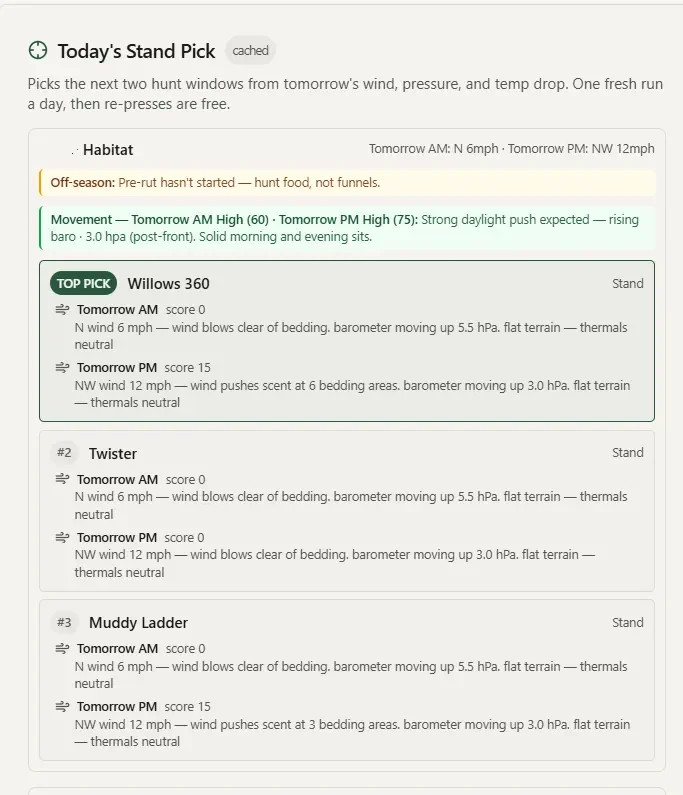
Each email also includes a rut activity callout anchored to your latitude (with the option to override the peak date from your own trail-cam history) and a cervid daily-activity score that tells you whether deer movement is expected to be peak, high, moderate, or low, and which weather factor is driving it. In plain English, not a number you have to interpret.
Daylight card: When the Sun Actually Hits Your Stand
Most sunrise/sunset apps give you the astronomical numbers. Hunting Scout gives you the real ones.
The Daylight card shows legal shooting light, morning and evening golden hours, and civil twilight bookends for your property's exact coordinates. The feature that sets it apart is the terrain-effective light block. When ridges block the sun, the card tells you when the sun actually clears the east ridge and drops behind the west one, not when the tables say it should.
If you've ever sat in a bottom waiting for shooting light and watched the sun hit the opposite ridge 20 minutes before it reached you, this puts a real number on that gap. The daily stand picks email includes per-stand terrain light data for your top-ranked stands, so you know exactly how much terrain shadow shifts your legal shooting window at each position.
The Habitat Strategist: Your Virtual Land Management Consultant
This is the feature I'm most excited about, because it brings together everything I've learned in 25 years of managing habitat with everything the app knows about your terrain.
The Habitat Strategist reads the spatial relationship between your tagged bedding zones and feeding areas, examines the topography within your drawn property boundary, and suggests specific plantings at designated anchor points. The goal is straightforward: pull deer out of bedding earlier in the afternoon and onto your property in daylight.
The Strategist runs multiple detection tools to evaluate your property for gaps in the bedding-to-food chain, access-route exposure, scent risk on tagged stands, thermal cover gaps, and line-of-sight problems. For each issue it finds, you get a specific prescription anchored to a specific location on your map, with species recommendations rated for your USDA hardiness zone.
Those prescriptions are cover-aware. The app reads the underlying land cover data and adjusts automatically. Open ground gets planted screen recommendations with a perennial/annual toggle and a seed calculator. Anchors in timber switch to hinge-cut and interplant prescriptions. You don't tell the app what's under the canopy. It already knows.
Whole-Field Bundle Prescriptions
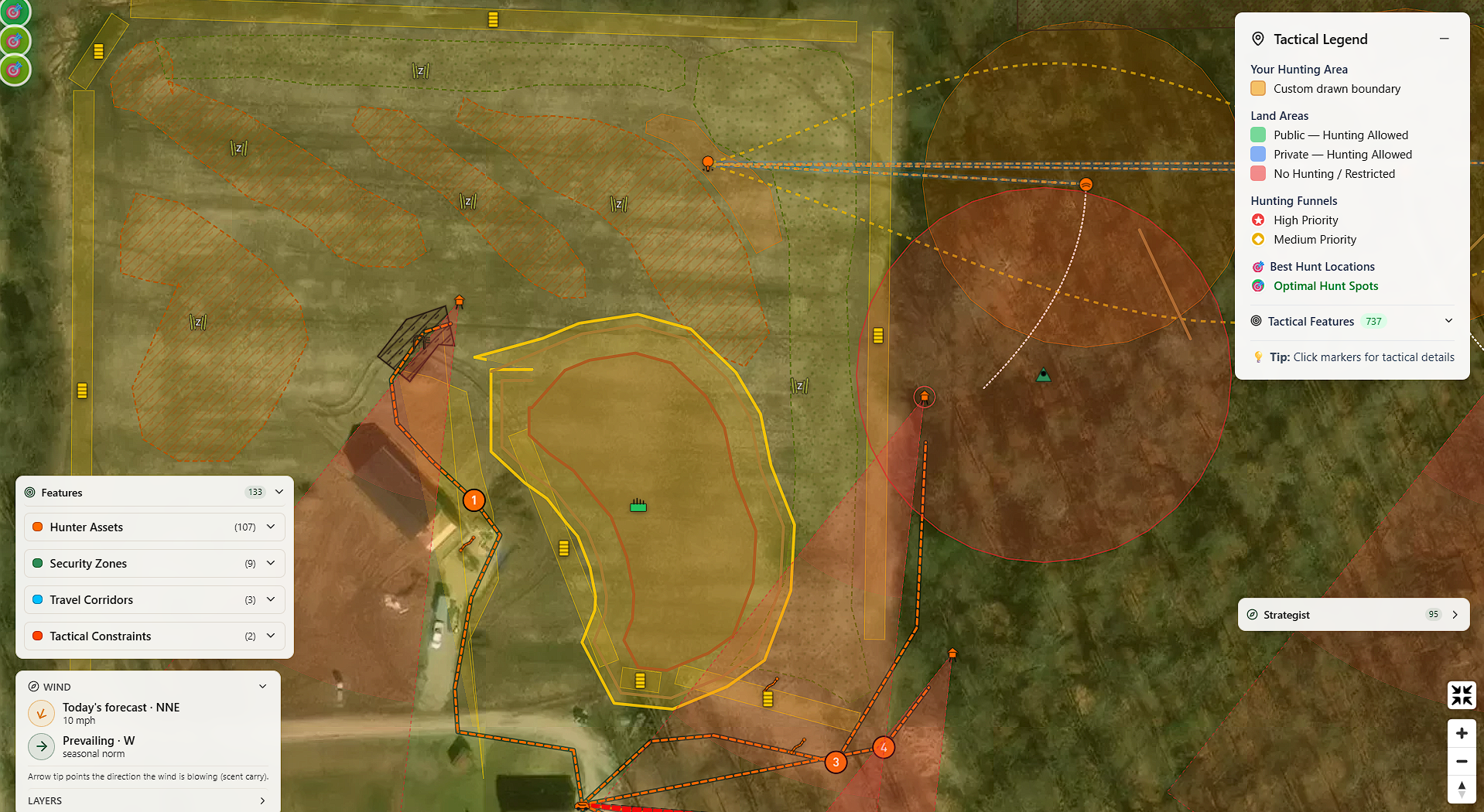
For properties with open ground, fallow fields, cleared agricultural land, or large food-plot zones, the Strategist generates a coordinated bundle on every food-plot drop. Three pieces ship at once: the plot shape itself (kidney, linear, or rectangular, picked to fit the field geometry), the edge feathering around it sized to the plot footprint, and a visual screen tucked behind it that breaks the line-of-sight on the wind your stands depend on. Accept the bundle in one click and the map paints all three overlays in their proper proportions. Each piece becomes its own editable tactical feature afterward.
Summer and Fall Food-Plot Engines with Frost-Flip Alerts
Food plots are not a single prescription type. The Strategist generates them by season. Summer Food Plot delivers warm-season seed blends that peak in nutrition in late summer, when fawning occurs and antler-growing bucks need the most calories. Fall Food Plot delivers cool-season multi-species blends that establish in late summer and run hot through the rut and into winter. When the Strategist detects a stretch of late summer where neither blend is hitting peak palatability on your property, it drops a Summer Nutritional Gap prescription sized to close the gap without overcommitting acreage.
The morning after the first hard freeze hits a fall food plot on your property, a frost-flip alert lands in your inbox telling you the freeze hit and what it means: brassica sugars spike, broadleaf attractant value climbs, and the deer pattern around the plot is about to shift.
Sanctuary-to-Forage Ratio
The Strategist header carries a sanctuary-to-forage ratio strip showing the acreage your tagged bedding zones cover relative to the acreage of your food plots and forage features. Whitetails want a high ratio. Bedding-rich properties hold deer through pressure. The strip turns red when the ratio runs low for the property size, so you have an at-a-glance check on whether the property is pulling deer in or pushing them out.
Per-Segment Access Path Scoring
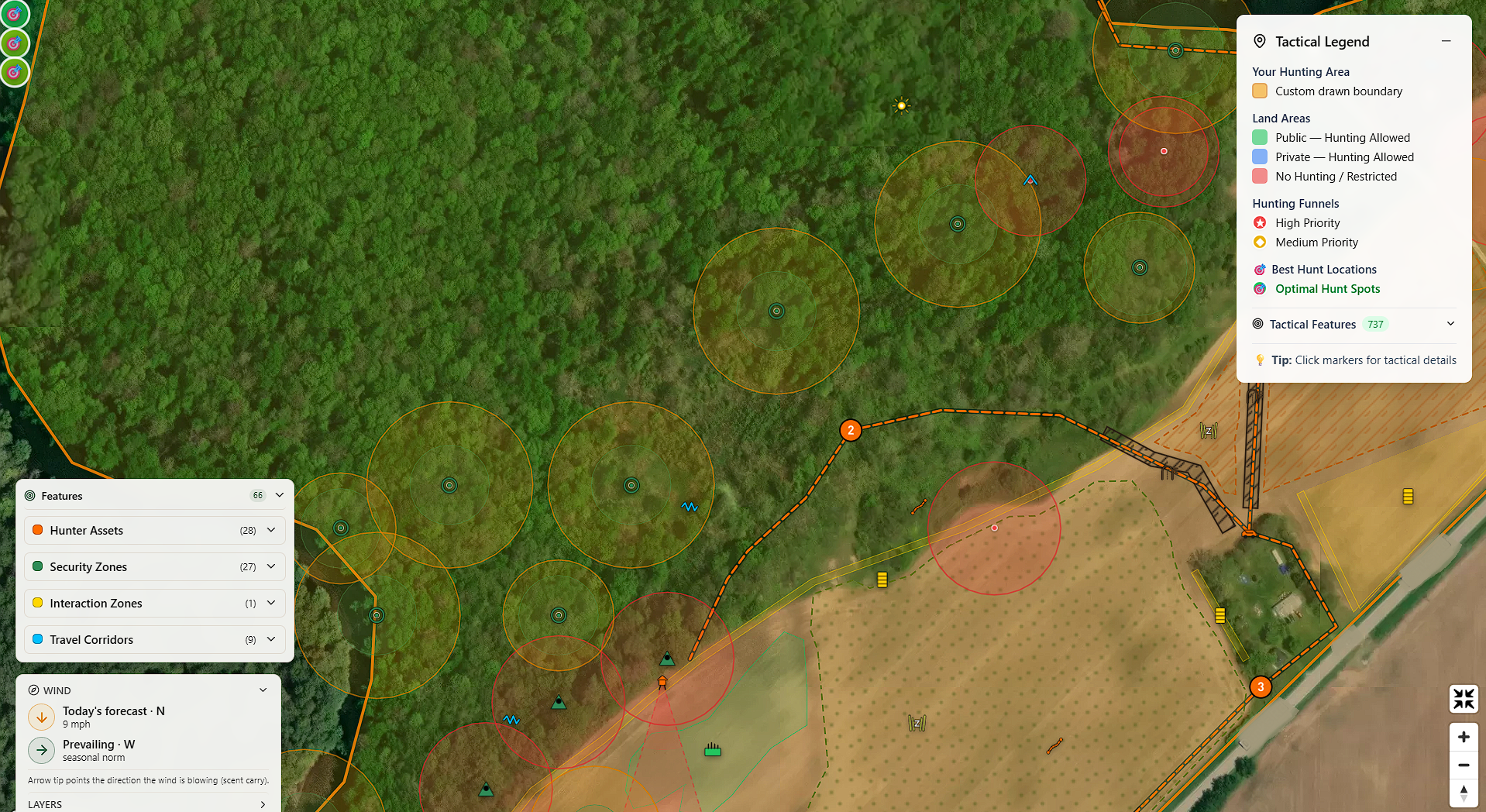
The Entry/Park feature deserves its own mention. Tag where you park, and the Strategist builds and scores multiple candidate walk-in routes based on how exposed each one is. Each path renders per-segment in three tiers, Clear, Partial Exposure, and Critical Exposure, so you can see exactly which stretch of the walk-in is the problem. Hunter and cervid polylines paint as smooth curves rather than angular straight segments, with a soft glow halo on hunter paths so the visual signal is unmistakable. The safest route paints on the map with the per-segment color coding, and screen prescriptions drop on the worst stretches. A daily-rotation advisory appears once you have two or more drawn paths so you never walk in on the same path two days in a row.
When you're done, export a plain-text shopping list sorted by species. Pro Habitat subscribers get a branded PDF habitat plan built for handing to clients.
If you've been reading the food plot and habitat content here on LandsToHunt, you know I think about bedding, staging, food, and travel corridors as a connected system, not individual food plots dropped randomly on a map. The Habitat Strategist is that thinking, automated, and anchored to your specific ground.
NWSG Bedding and Daylight Probability
This one is personal. I've planted and maintained switchgrass bedding on my own ground in southwest Michigan for years, and I know firsthand how a well-placed Native Warm-Season Grass block changes deer movement. How to Prepare for a Late Spring Switchgrass Planting.
In Hunting Scout, you can tag a NWSG bedding block as Architectural Cover. When you do, the app models how that dense grass column interacts with your scent cones and your kill plots. Kill plots near a NWSG block get a Daylight Probability score on a 0 to 100 scale that accounts for bedding proximity, plot aspect, nearby food-plot pull, and disturbance distance. This is the answer to "where should I put a kill plot relative to my bedding," expressed as a number you can act on.
How to Get Started
The free tier gives you 3 scouting reports per month. No credit card required. You get terrain analysis, public-land overlays, hunting funnels, weather data, and the full tactical feature classification system.
Paid tiers add the features that turn scouting into a daily decision engine:
Basic Hunter: Higher monthly report limit plus historical weather data
Premium Hunter: Optimal hunt spots, auto-plotted tactical features, weather alerts, the full stand toolkit with scent cones and ranked daily picks, rut and movement predictors, and the Today's Light card with terrain shadow
Premium Habitat ($19.99/mo): Everything in Premium Hunter plus the Habitat Strategist across unlimited drawn properties (whole-field bundle prescriptions, summer and fall food-plot engines, frost-flip alerts, sanctuary-to-forage ratio, per-row planting calculator, per-segment access-path scoring) and a shopping list export
Pro Habitat ($29.99/mo): Adds the branded PDF habitat plan export for consultants and land managers
Per-Property Unlock ($49 one-time): Lifetime Habitat Strategist access on a single drawn property, no subscription needed
If you manage your own land and want the habitat tools on one parcel, the $49 per-property unlock is the best value. If you manage multiple properties or consult for clients, Premium or Pro Habitat makes more sense.
Why I Built This
I got tired of toggling between six apps and a stack of paper maps to answer questions that should take 30 seconds. Where's my scent going from this stand on tomorrow's wind? Is there a terrain funnel I'm missing on the back side of this ridge? Does my bedding-to-food chain have a gap I haven't addressed? What time does the sun actually clear the ridge east of my morning stand?
Hunting Scout is the tool I wanted to exist. Real data, pulled from federal sources, organized around the way hunters think about terrain, wind, and movement. Not a mapping app. Not a weather app. Not a food-plot planner. All of those things at once, talking to each other in one interactive report.
I'm still building. Subscribers get every new feature the day it ships. The past several months have added whole-field bundle prescriptions for open ground, season-specific food-plot engines with frost-flip alerts, a per-row planting calculator scoped to your USDA planting zone, a sanctuary-to-forage ratio strip, and per-segment access-path scoring with smooth-curve routing. Each one is anchored to your specific property and to data you can verify.
Generate your first scouting report free at hunting-scout.com. Three reports per month, no credit card, and you'll see exactly what your ground is telling you in about 30 seconds.
